This GreaseMonkey Script shows non-justified thumbnail views for Flickr Photostreams and Sets. It is designed to improve Flickr usability for users with slow internet access.
1) Install "GreaseMonkey" or an equivalent extension:
Groups, Search results, Favorites, Contacts recent uploads and other flickr pages are still shown with justified views. I'll see if I can extend the script to deal with those.
When visiting a set or photostream from a link on a photo-page, the page you reach does not always show the photo you come from.
This script does not change the flickr landing page (i.e. home page), which is very heavy. Maybe it should replace it by the user's Activity page?
4) Fixed bugs (update the script if you experience those issues)
In some circumstances, the top-bar of the Organizer would disappear.
This User Style shows the group discussions in a more compact, easier to read and more manageable style in the new group layout. This style only affects discussions in the new Groups layout (i.e. Group home page and "Discussion" tab).
Note: For some reason, it is sometimes necessary to reload the lightbox page for the slideshow to work as expected (i.e. without Ken Burns effect). I have no idea why those styles are not always effective. If you can figure out why, please contact me with the info!
With this, the big black Flickr nav-bar will stop "floating", giving you the entire screen space to view photos! The big black Flickr nav-bar will be at the top of each Flickr page, where it used to be, and it will scroll with the rest of the page (rather than occupy precious screen space). I can't live without this one.
The old solution below (unmaintained) was only for Chrome, and uses the "Personalized Web" extension. You should probably not use it, since several bugs have been fixed only in the new Stylish solution.
2) Triple-click the box below to select all the text, then Copy (CTRL-C)
3) In Chrome > Tools > Extensions > Personalized Web > Options, click "Load Dump", Paste (CTRL-V) and click OK.
Then, no more Yahoo nav bar on Flickr!
As a bonus, with the following code, the big black Flickr nav-bar will stop floating, giving you more screen space to view photos! The Flickr nav-bar will be at the top of each Flickr page where it used to be, and will go off-screen when you scroll down. Install this code with the same steps 2) and 3) above.
You have the option to de-select the "flickr un-float nav bar" in the "Personalized Web" extension if you want the Flickr nav bar to float again.
"No budget" is a euphemism for "we think photographers are mugs". This offensive interpretation can easily be verifed by trying the phrase at your local restaurant, eg "I have no budget for dinner but I'd like to eat". Adding a promise to tell all your friends where you ate will not deflect your head from the kerb as the manager throws you out.
Now imagine being a restaurant where most people who come through the door try this on. The answer is NO, and I am being excessively polite.
If you didn't really mean it and your "no budget" claim was just an opening bid, the answer is still NO. I want nothing to do with greedy opportunists who try to commence a negotiation with a lie. You have already demonstrated you cannot be trusted. You probably won't be honest about usage, and will try not to pay.
And if you were one of those promising lots of better, paid work later, if only I can help you out now, offer a contract else I'll know you're talking bullshit and the answer is of course NO.
You see I don't want your "free exposure", I want mutually beneficial, productive relationships with clients. I try to behave with integrity, honesty and fairness, and I expect clients will do likewise. Exposure is the end of that process, not a means. Similarly with bylines. I don't require applause earned by being a sucker. If free matters more than good, ask someone else.
Like most people I work because I need to pay bills and support myself, my work and my family. The fact that I love what I do is why I have spent 40 years persevering whilst going without stuff most people take for granted. Vocation is not an invitation to disrespect.
Some people do not understand that my photos only exist because I have invested time and money and learning in creating them.
Unsurprisingly I will not support questionable business models that rely on exploiting photography, or me, to extinction. With very rare exceptions (small charities run by unpaid volunteers that I choose to support) I have no budget for subsidising other peoples' work and profitability. Supporting my own is next to impossible thanks to the current vogue for passing off exploitation as opportunity.
When I can afford it, I will drop a few quid into a charity box or give to a homeless person on the street. I regularly work for charities at a discounted rate. I look after baby birds that have fallen out of nests. I am a generous, kind and loving human being. But I make an exception for salaried beggars who ask me to stuff a bundle of tenners in their pocket. They just piss me off. Especially when they insult me by telling me my life's work is jolly nice but worthless.
Supply without payment is, of course, only viable for hobbyist photographers who don't need an income from their photography. They have salaried jobs, pensions or private incomes, or perhaps suicidal romantic tendencies. I do not. They have a selfish attitude to destroying the sustainability of photography as a profession which they call "beating the pro's at their own game". Moreover a byline might appeal to their idiot vanity. I suggest you ask one of them. Alternatively find a new graduate or student to exploit - they are desperate and naive, and you have the opportunity to add to their crippling student debt by saving yourself a few quid.
If all this means you can't source the images you want, that is just tough. I can't source free cameras, computers, software, food, housing, fuel, either. If it's all so damn easy and cheap, go and make your own photos.
If all this offends you, best stay away from mirrors too.
Below are the instructions for signing my Model Release.
It should take less than 5 minutes of your time, and I appreciate very much you doing that for me, as some of my photo agencies require that I have model releases for using my photos.
1) Print this Model Release Form (also available in other languages here). If you have no access to a printer, let me know, and I will snail you the form together with a stamped return envelop.
2) Fill-up your information in the Model Information section (ignore the top part "Attach Visual Reference"). If privacy is an issue, you can provide a work address or a friend's address.
3)Ask someone you know (aged 18 or older) to fill-up the Witness section
4) Send me back the signed form with one of the following ways:
Fax me backthe form at +1 415 704 3224 in superfine resolution (no need for a cover page). Please email me (tristan@bok.net) to confirm that the fax was sent.
If you have no access to a fax, you can also email me (tristan@bok.net) a good digital photo or scan (e.g. pdf) of the signed form.
Several people have asked me that question: What do you use to make the watermarks on your photos?
To create the semi-transparent watermarks on my photos, I use Photoshop and ImageMagick (a server-side image manipulation program that can be scripted).
With Photoshop, I created custom "actions" and "droplets" (i.e. scripts that automate a series of commands) to add various layers with the watermark, using appropriate blending modes to give the semi-transparent effect. With ImageMagick, I wrote various server-side scripts to dynamically add some watermarking, e.g. when my images are shared with social networks like facebook, twitter, tumblr etc.
But creating those scripts this is quite complicated and require a very good knowledge of layers, blending modes and scripting, so I do not recommend this approach unless you are very good with Photoshop or know how to program scripts that use ImageMagick.
The good news is that there are web services that can add watermarks on your photos for free, like https://www.watermark-image.com, http://www.watermark.ws or http://picmarkr.com . Those probably work pretty well in most cases, so you should try them. I am sure there are other services like those, just google "watermark online" or "online watermarking".
I received an e-mail from a well known artist who showcased many large art installations at Burning Man, and who was concerned that selling individual prints online of photos of his art taken at Burning Man was infringing on the copyright he own over his art and any photos of it.
Shared Copyright: I am fully aware that all photos taken at the Burning Man Festival have a copyright that is shared between the Burning Man Organization, the photographer, and possibly the artists who's arts are represented on the photo. I do mention the artist name in all my photos descriptions (when it is known), and not only that, but i give a direct, clickable link to their website (when i know it), which most other photographers don't do. The copyright watermarks on my photos are generated automatically, and it's not very practical to create different watermarks for the photos of each different arts, but i am fully aware that my copyright is not the only one that governs the use of my Burning Man photos.
Why this ugly watermark? The reason for the ugly copyright watermarks on my photos on Smugmug (the service I use for printing) is that my hi-resolutions images can be accessed on Smugmug, so they need to be protected. I use Smugmug only for the printing process, not for showcasing my photos. My photos are best viewed using the "Slideshow feature" from Flickr.
On Smugmug there is currently no text description for any of my photos - I am working on that - but people arrive to Smugmug from my other sites only when they want to order a print, and the Smugmug galleries with Burning Man photos are password-protected.
Why I let people order prints of my photos online: In the past many people have asked me for prints of Burning Man photos, and I would always send them the hi-res file, and tell them to burn a CD-ROM or DVD (or copy the file on a memory card) and bring it to a store to make the prints themselves. I do not have the time anymore to do that, and when I do that, it actually costs more to those people in time and efforts to obtain the prints, compared to ordering them on-line. This is why I now let people buy prints on-line from Smugmug. I make no profit from that, since the cost of the Smugmug hosting service is on my bill ($150/year), and the small markup (on the prints) will probably never offset that cost.
Of course I still send the hi-res files to the artists (and models) who ask for them, and to the Burning Man Organization, but if they want to get prints, it is generally cheaper and faster for them to order them on-line rather than to print them from the hi-res files.
It is very difficult for me to get paid for the time and effort that I spend with making Burning Man photos (and photography is also a form of art). I spend about one month working on them every year, and make virtually no money with them. Actually last year, the revenues I got from Burning Man photos licensed to magazines was about $200). That does not pay the bills, it does not pay for my time, and it is not an incentive to continue making this kind of photos (even with all the rave revues i get from Burning Man lovers).
My point in allowing people to order prints of my Burning Man photos on-line is not to make a profit or to exploit someone else's art, but to provide something that many people ask me, and do it in a more efficient, cheaper (for me and the people who want photos) and faster way that before.
To support the artists, we encourage you to contact them directly and ask them if they sell other photos of their arts.
If your art is represented on one of my photos and you do not want people to be able to buy prints of these photos, let me know and I will take the photos off Smugmug (where people order the on-line prints), and I will place a notice that prints are not available for these photos, upon request of the artist who's art is on the photo.
I wish I could have personally informed the 500 artists who's art are on my Burning Man photos that I intended to make prints of them more easiely available on-line, but it would be a dawnting task. I don't have a list of the phone numbers or contacts for those 500 or so artists, and gathering it would take another couple of weeks, a time that I don't have.
Feel free to post comments or contact me about this post.
You can now order high-quality prints and posters, cards, Fine Art archival prints and canvas prints of most of my photos on-line from my website (with no watermark, of course!). The prints orders are processed by fotomoto.com, a San Francisco based startup and provider of professional-quality prints. Prints are produced by Bay Photo Labs (Santa Cruz, California). They will redo prints if you are not satisfied by the quality and return them within 30 days.
If you are still using Internet Explorer 6, you should upgrade your browser!
A lot of the cool new dynamic features of the so-called "web 2.0" are not well supported by IE6 because of its limited and buggy javascript and CSS support.
You can download the latest versions of the most popular internet browsers below:
I have added a cool free real-time statistics widget from whos.amung.us in the menu-bar on all my pages, including this one:
If you click on this widget (here or in the menu bar), you will see how many people are currently browsing this site, in what part of the world they are located, and what photos they are looking at (in real time!).
For the most interesting display, click this widget, then click on the "Recent" on the "readers" page to see the countries of the visitors and the page they are looking at (and you can check out those pages!).
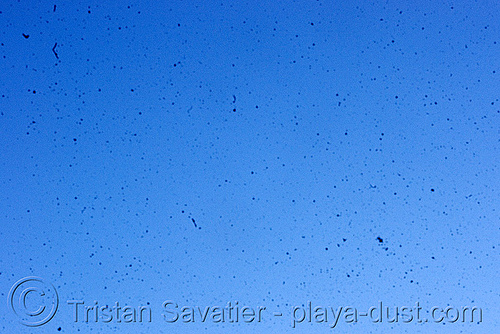
This is a sensor test photo that i took at Burning Man 2008, with the diaphragm (aperture) closed to the maximum (i.e. maximum F-value, F32) shooting the blue sky. I have never seen as much dust on my sensor. Good thing I know how to clean a CCD sensor :)
I recommend a Giottos Rocket air blower to remove the bulk of the dust, then you can use the wet sensor swabs (with 100% pure methanol optical solution, also called methylic alcohol) to remove sticky particles that don't go with the air blower, if necessary.
Don't put more than a couple of drops of methanol on the swab, otherwise it would be too wet and leave deposit marks on the sensor. You will have to clean several times before getting a clean sensor, especially the first time. To clean, you must sweep the swab on the sensor from side to side. For best results, the width of the swab should the exact width of your sensor, so that you only need one sweep. Swabs made by Visible Dust. are excellent quality, I use those. After sweeping, put back the lens and do a test shot, then zoom on the image and check if there is still dust. usually the dust is located near the corners or near the edges. if you see dust, repeat the process.
To do a test shot, you must set the camera in A mode and close the apperture to the maximum F value (e.g. F32), and take a photo of something uniform, e.g. the sky or just a piece of paper. Set the camera to manual focus and make it completely out of focus, so if you see a dot on the test shot, it will be dust.
Sensor cleaning was painful at the beginning, it took me one hour to get all the dust OFF the first time. But now i can do it in two of three iterations, and it takes 10 min or so, and I am no the least nervous about doing it on my expensive camera.
Also, remember that if you have dust on your sensor, it will probably not show on your photos if you shoot with maximum apperture (i.e. minimum F value, e.g. F2.8 or F3.5). So if you have dust on the sensor and must continue to shoot with the dust, remember to shoot in A-mode (apperture priority) and use maximum apperture, i.e. use the minimum F value of your lens.
Dry-cleaning the sensor with rotating brushes charged with static electricity will work only with the dry, non-sticky particles on the sensor. But it will not cleanup sticky or greasy particles. Those can only be removed with a wet swab. So even if you get one of those dry cleaning brushes (e.g. Arctic Butterfly), sometimes you will still need to use the wet swabs.
NEVER ever use a spray can to blow away the dust inside the camera. The very cold gas out of the air-can would cause irreparable damage (micro-cracks) to your sensor.
There are other CCD cleaning options available, but that's what I use and it works well for me. Or you can pay a professional to do it, but it usually takes several days and it's not cheap, and this is not always possible if you travel. So you'd better learn how to do it yourself.
World-wide shipping (international). Secured on-line payment by Credit Card. Full refund with 30-day guarantee if not satisfied.
There are many different versions of this cool cow, each available on a variety of T-shirts, Sweatshirt and other objects. Click on a link to see them and order:
Most of my photos can be licensed for commercial or editorial use (advertising, news, magazines, brochures, books, websites, flyers etc).
To license one of my photos on-line, click the "Buy a License" or "License this Photo" button on the photo page on the www.loupiote.com website.
High-resolution files with no watermarks are available for all photos, depending on the licensing type.
If the "Buy a License" or "License this Photo" button is not available on the photo page, please contact me for licensing inquiries and royalty fees. Please indicate the photo URL and describe the exact intended use.
Free use: You can share, post or blog most (*) of my photos on personal, non-commercial web pages or blogs with no advertising, provided that you keep my copyright watermark and that you give proper credit to the photographer (Photo by Tristan Savatier - www.loupiote.com) and a working link to www.loupiote.com (see blogging conditions here). To post on Blogs or Forums, please use Get ImageCode or Embed (button on each photo page).
Note that Flickr, Facebook and other social websites do not allow posting photos that you did not take yourself, so don't repost / upload copies of my photos (or any other photo found on the internet) on those social websites, or you risk your account to be deleted. I do not authorize copies of my photos to be uploaded on social networks or photo-sharing sites. However, you can share my photos using the share links on each photo page.
All photos copyrighted by Tristan Savatier have All Rights Reserved. They cannot be used or reproduced without Tristan Savatier's written permission, except for the authorised free NON-COMMERCIAL use.
All photos by Tristan Savatier are Copyrighted with All Rights Reserved.
You are allowed to display most (*) of Tristan Savatier's photos for free under the following conditions:
(*) Photos that you are not allowed to use on non-commercial sites do not have the "Get Image Code" or "Embed" button.
READ THE TERMS CAREFULLY BECAUSE:
All my photos must be properly properly licensed in order to be used commercially. My photos that are represented by agenciesmust be properly properly licensed from those agencies in order to be used commercially. Agencies can sue people mis-using the photos that they represent, so you might want to ask me for permission before using my photos if you are not sure. If you were using a photo and it later became represented by an agency, you might need to cease using it or license it from the agency, unless you had my written permission for the use.
When someone uses my photos without permission or in breach of the conditions below, I file DMCA Notices or Copyright Infringement notices with their service providers and Web hosting company, and that causes the infringing user accounts (e.g Blogger / Adsense / Yahoo account) to be immediately terminated and their sites to be de-listed or penalized. So make sure to follow all the conditions below, or to pay the required licensing fees before using my photos on your website or blog.
1) Only on NON-COMMERCIAL blogs, webpages or forums, that DO NOT HAVE ADVERTISING.
If your blog or website contains advertising, you must obtain written permissionor license the photo.
2) Send the web link (URL) of your blog or webpage.
If you don't, no big deal, I generally find out by other means, but i like to know where my photos are being used.
3) Do NOT copy, duplicate or upload my images on your server, your blog etc. You MUST use an "img" tag with "src" pointing to the original image on my website
The simplest way is to use the Image Code provided in each photo page. Click on Get Image Code or Embed to get the HTML code for putting the photo in your blog.
4) Hotlinking of my Images is Not Permitted on Automatically Generated Pages
I reserve the right to block image serving or serve unwanted images when the referrer is determined to be an image hotlink abuser or automatically generated page.
5) Please provide Copyright attribution / Credit:
If possible, put the following line (with a working link) immediately under the photo:
Copying or duplicating my images on another site or cropping-off my copyright watermark in the photos is not allowed, even if you find my images already cropped or duplicated on another site.
6) IMPORTANT: Always back-Link the photo to the original photo-page (see below):
You must link the photo itself to the original photo-page, i.e. where the description of the photo can be seen. If you cannot locate the photo-page, link the photo to http://www.loupiote.com. The link should NOT contain rel="nofollow".
The simplest way is to use the Image Code provided in each photo page. Click on
Get Image Code or Embed to get the HTML code for putting the photo in your blog. You can customize the html code to change the image size or add CSS styles such as style="float:left".
7) Recommended way to Blog or Share my photos:
The simplest way is to use the Image Code provided in each photo page. Click Get Image Code or Embed to get the HTML code for putting the photo in your blog.
You can also use the or Share link above the photo on my http://www.loupiote.com/website photo-page. If you come from Flickr, to find the photo-page on loupiote.com, search for the flickr photo title with the loupiote.com search box, or contact me.
Sharing my webpages on Facebook or other social networks is allowed as long as you do not upload copies of my images on those social networks. I.e. you are allowed only to share links to my pages or images.
8) You must remove my photo(s) from your blog or website if requested
In some cases I may ask that you remove my photos from your blog or website, or from a forum where you have posted them or a forum that you control. If requested to remove my images, you must obey the request.
Conditions for use on commercial blogs or websites:
If your Blog or website is commercial or displays advertising (e.g. google adsense), use of my photos is NOT PERMITTED unless you have obtained my written permission or you have properly acquired a license for commercial use.
To license my photos on-line, click the "Buy a License" or "License this Photo" button on the photo page on the www.loupiote.com website.
When someone uses my photos without permission or in breach of the conditions listed on this page, I file DMCA Notices or Copyright Infringement notices with their service providers and Web hosting company, and that causes the infringing user accounts (e.g Adsense account) to be immediately terminated and their sites to be de-listed or penalized. So make sure to follow all the conditions, or to obtain permission and pay the required licensing fees before using my photos on your website or on blog.
All my photos are Copyrighted with All Rights Reserved. Most of my photos can be licensed for use in magazines, advertising, brochures, books etc. Please contact me for licensing informations and fees. And if you like my work, don't hesitate to follow me on Instagram or drop me a word.
If you are also interested by urban exploration, i.e. exploring dis-used buildings and factories, abandoned tunnels, etc, check out www.urban-resources.net, an excellent database of photography books and other resources on this subject.
 Loupiote Photography
 Share
Share

 or
or  Share link above the photo on my